

Managing leads, contacts, follow-ups, and sales opportunities can quickly become complicated when information is scattered across spreadsheets, emails, and different business tools. Pipedrive is a sales-focused CRM designed to bring these activities together in one platform.
Pipedrive CRM is built around a visual sales pipeline that helps businesses organize leads, track deals, manage customer interactions, automate repetitive tasks, and monitor sales performance. The platform also includes reporting, integrations, AI-powered features, lead-generation tools, meeting scheduling, and workflow automation.
But is Pipedrive the right CRM for your business in 2026?
In this Pipedrive review, we’ll cover its features, pricing, benefits, limitations, ease of use, AI capabilities, integrations, alternatives, and who should consider using it.
What Is Pipedrive?

Pipedrive is a cloud-based customer relationship management (CRM) platform focused primarily on sales teams and sales processes.
The platform allows businesses to store customer information, manage leads and contacts, create sales pipelines, track activities, schedule meetings, automate workflows, and analyze sales performance.
Its visual pipeline is one of its defining features. Sales teams can organize opportunities by stage and move deals through the pipeline as they progress from initial contact toward closing.
Pipedrive also provides more than 500 marketplace integrations, allowing businesses to connect their CRM with other applications used for communication, productivity, marketing, accounting, and sales.
Pipedrive Highlights
- Visual drag-and-drop sales pipeline
- Lead and contact management
- Deal and activity tracking
- Customizable CRM fields and pipelines
- Sales automation
- Email synchronization and tracking
Pipedrive Features
1. Visual Sales Pipeline
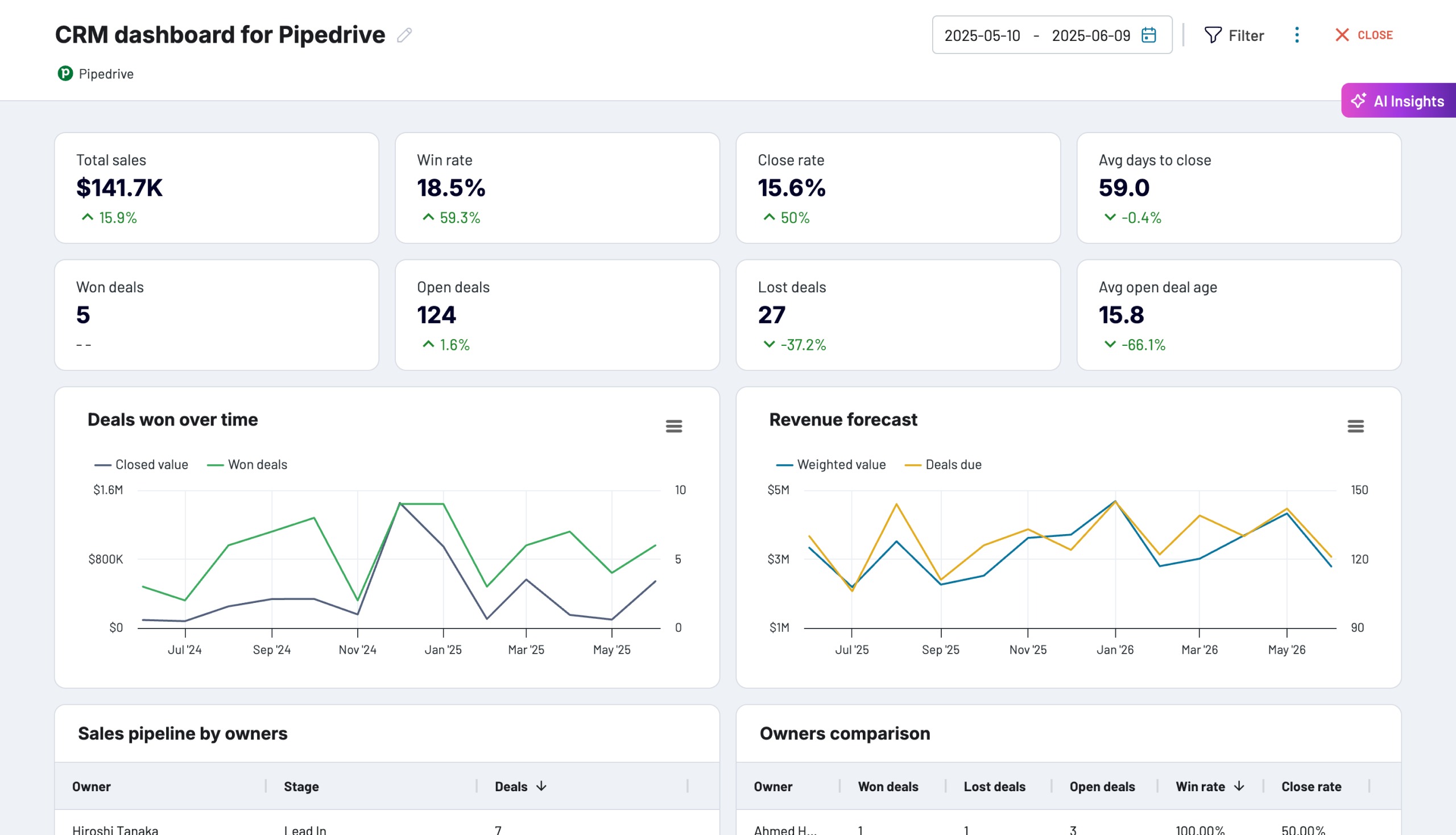
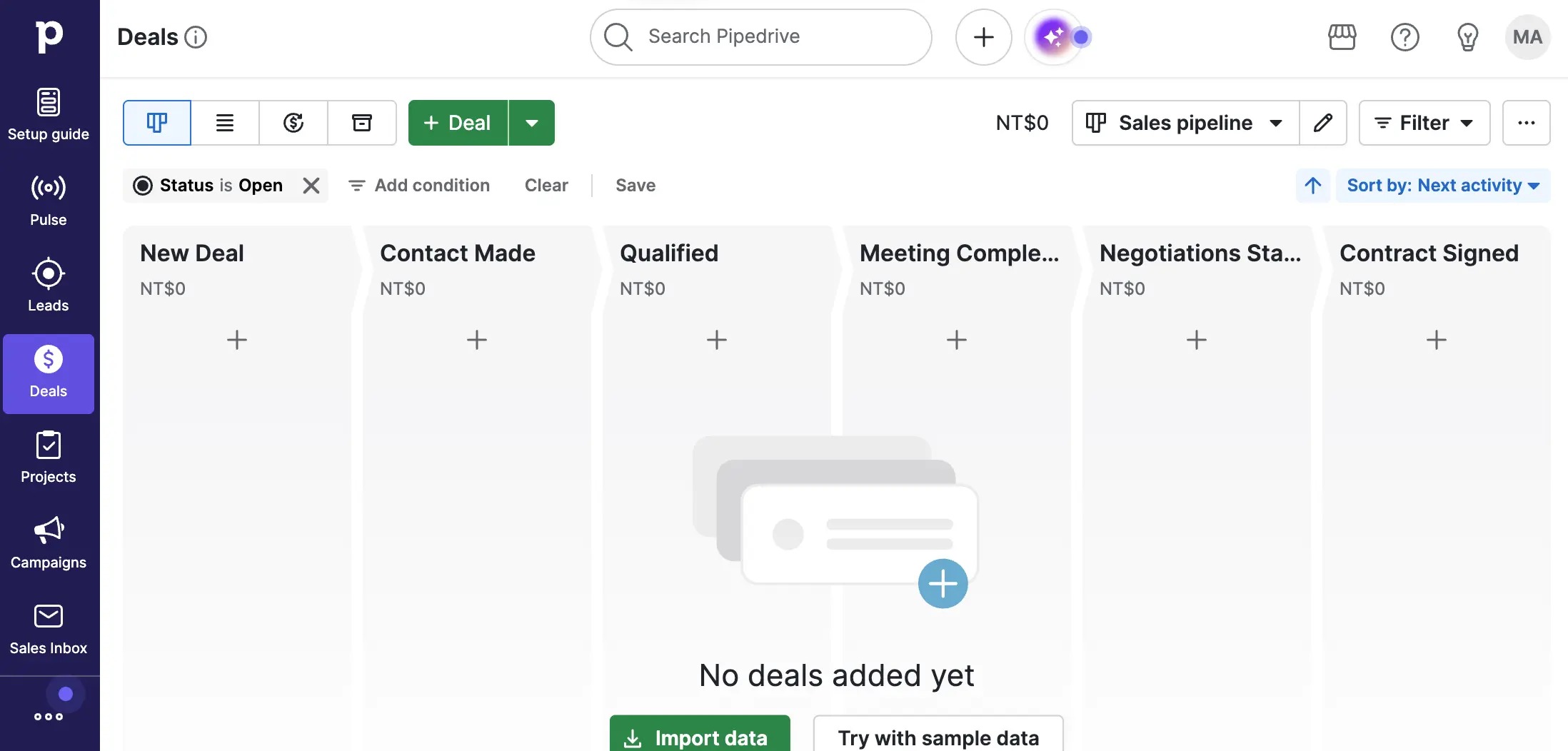
The Pipedrive sales pipeline is the core of the platform.
Instead of relying on spreadsheets to understand which prospects are active, sales representatives can view deals in a visual pipeline and organize them according to different sales stages.
Pipelines can be customized to match different sales processes, while deal cards can be configured to display relevant information. Pipedrive also supports features such as deal rotting, data importing and exporting, duplicate-data merging, and product catalogs.
This visual approach can make it easier for sales teams to identify active opportunities and determine which deals require attention.
2. Lead and Contact Management
Pipedrive provides tools for managing leads, people, organizations, and deals in a centralized CRM environment.
Teams can store customer details, track interactions, add notes, schedule activities, and connect contacts with relevant opportunities.
The system is designed to keep sales information connected to the deal rather than forcing representatives to search through separate spreadsheets or applications.
3. Deal Management
Pipedrive allows sales teams to track opportunities from the first stage of the sales process through closing.
Each deal can contain information such as:
- Deal value
- Sales stage
- Contact information
- Activities
- Notes
- Emails
- Expected close date
- Custom fields
- Products
- Follow-up tasks
4. Sales Automation
Sales automation can help reduce repetitive CRM administration.
Pipedrive allows teams to create workflows that automate tasks such as follow-ups, activity creation, deal updates, and other routine sales processes. Its CRM workflow tools are designed to automate repetitive work and help teams maintain consistent sales processes.
Automation can be particularly useful for teams handling a large number of leads or opportunities.
5. Email Integration
Email is an important part of most sales workflows, and Pipedrive connects email activity with CRM records.
Depending on the plan, users can synchronize email accounts, track communications, use templates, and manage sales conversations from within the CRM environment.
This can help sales representatives maintain a record of customer communication without manually updating every interaction.
6. Sales Reporting and Analytics
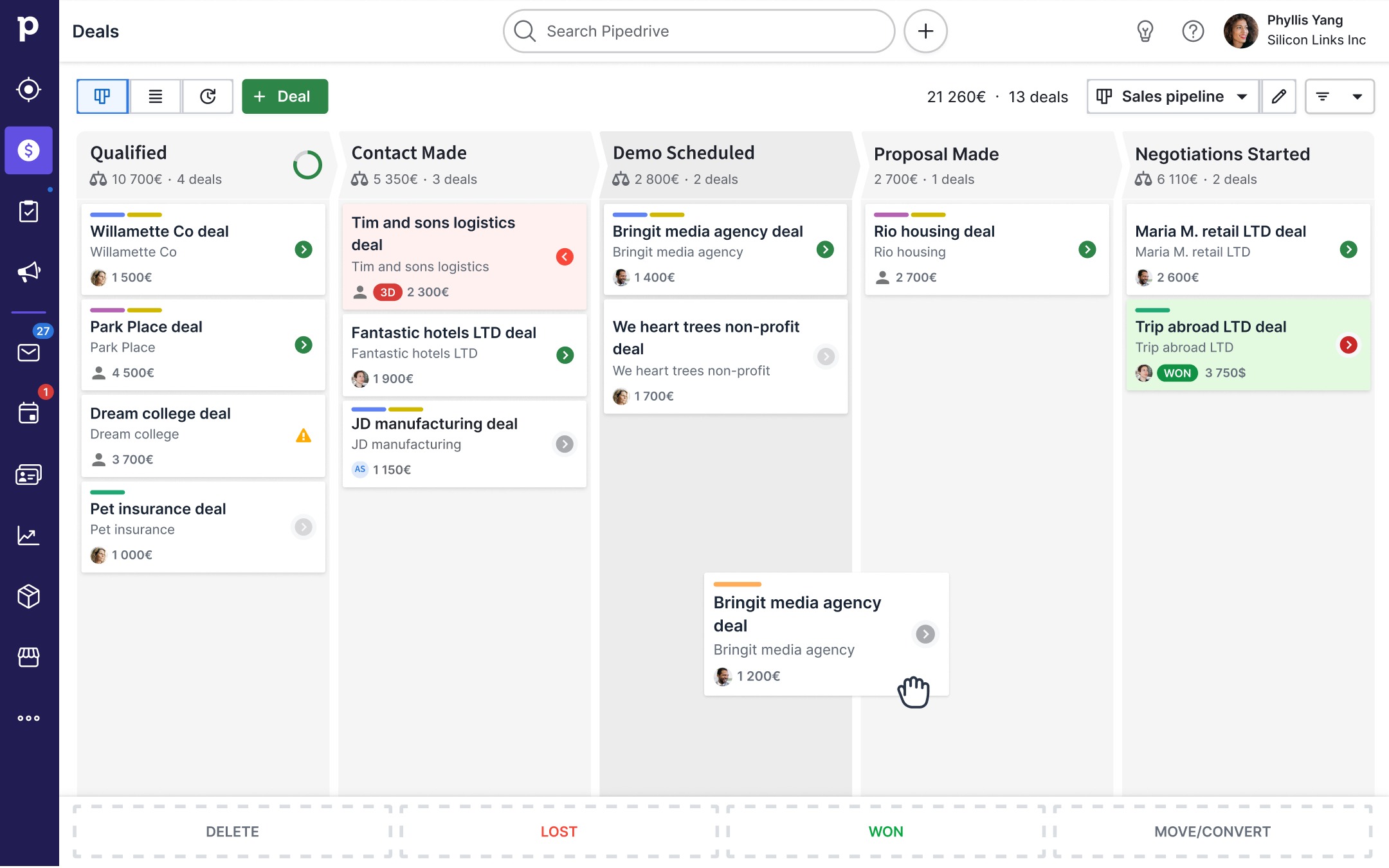
Pipedrive includes reporting and analytics tools for understanding sales performance.
Teams can monitor information such as:
- Number of deals
- Deal values
- Sales activity
- Conversion performance
- Pipeline progress
- Sales velocity
- Forecasting information
Custom reporting can help managers build dashboards around the metrics most relevant to their sales process.
7. AI-Powered CRM Features
Pipedrive has expanded its platform with AI-powered sales functionality.
Its current AI tools include an AI sales assistant, AI email writing and summarization, and AI reporting. These features are designed to help sales representatives reduce administrative work and access information more quickly.
Pipedrive’s AI capabilities can assist with tasks such as summarizing email conversations, generating sales reports, and identifying useful sales insights.
8. Pipedrive MCP for AI Assistants
One of Pipedrive’s notable 2026 developments is its native Model Context Protocol (MCP) server.
Pipedrive announced its MCP server in June 2026, allowing compatible AI assistants such as ChatGPT and Claude to securely interact with Pipedrive data and workflows.
According to Pipedrive, users can use natural-language instructions to search CRM records, update deals and contacts, create activities, analyze pipelines, and automate certain workflows. Access is governed by existing user permissions.
This creates a more direct connection between AI assistants and CRM workflows.
9. Lead Generation
Pipedrive also provides tools for capturing and managing potential customers.
Its lead-generation products include tools such as web forms, chatbot and live chat functionality, and prospecting features.
These tools can help businesses bring new prospects into the CRM before moving qualified opportunities into the main sales pipeline.
10. Meeting Scheduling
Pipedrive includes meeting scheduling functionality that helps sales teams share availability and arrange appointments with prospects and customers.
Keeping meetings connected to CRM records can help representatives maintain a clearer timeline of customer interactions.
Is Pipedrive Easy to Use?
One of Pipedrive’s main design characteristics is its visual sales workflow.
The platform uses a visual, Kanban-style pipeline that allows users to see where opportunities are in the sales process. Pipedrive also emphasizes simple setup, customizable pipelines, and workflow automation.
For sales teams that prefer a visual approach to CRM management, the interface can make it easier to understand active opportunities and upcoming activities.
However, businesses with highly complex CRM requirements may need more time to configure pipelines, fields, automations, permissions, integrations, and reporting.
Pipedrive Pros
- Visual and customizable sales pipeline
- Straightforward deal management
- Centralized contact and lead management
- Sales workflow automation
- Email synchronization and tracking
- Custom reporting and dashboards
- AI-powered CRM tools
- Meeting scheduling
- Lead-generation features
- Large integration marketplace
- Mobile access
- Flexible customization
Pipedrive Cons
- Advanced functionality is available on higher plans
- Additional add-ons can increase the total subscription cost
- Businesses with extensive marketing requirements may need additional software
- Large and complex organizations may require significant customization
- Some advanced features depend on the selected plan
Pipedrive Pricing 2026
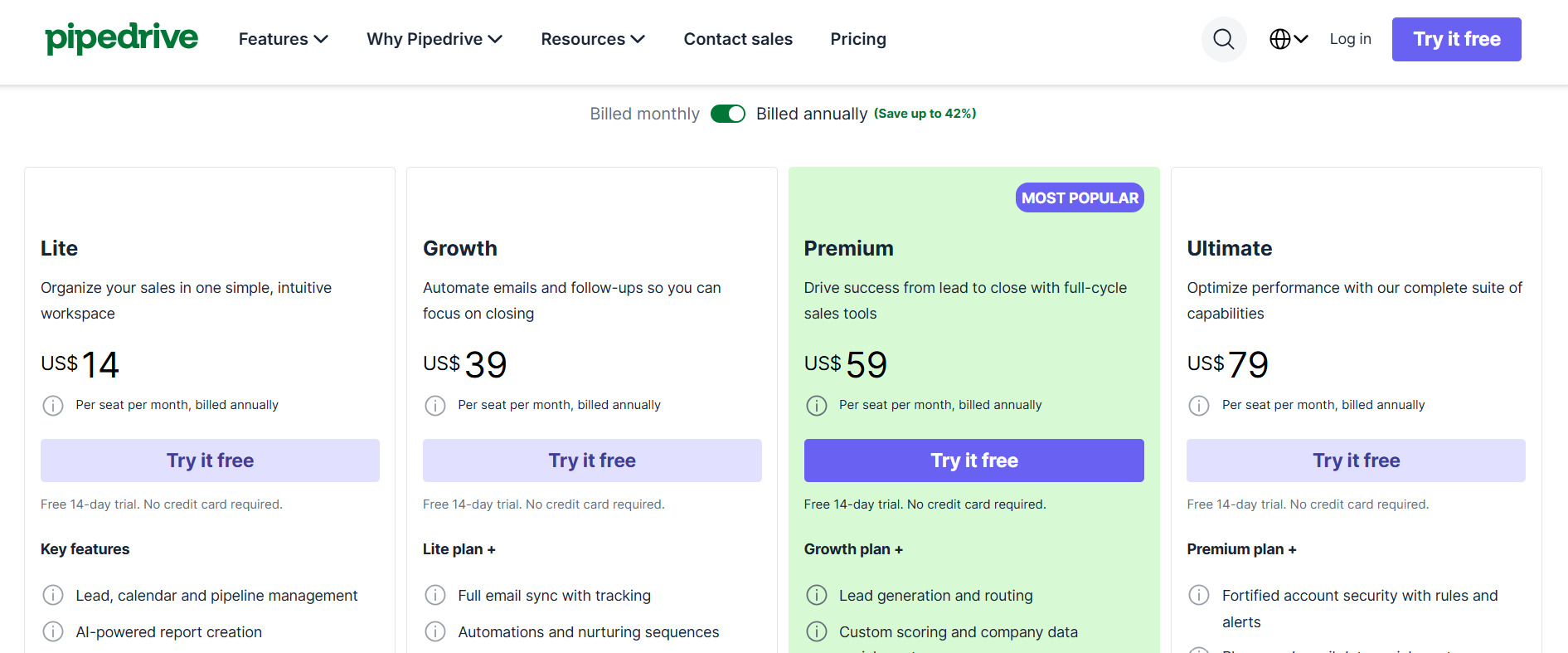
Pipedrive currently offers four main plans:
- Lite
- Growth
- Premium
- Ultimate
The exact amount you pay can depend on your billing cycle, number of users, add-ons, and top-ups. Pipedrive confirms that subscriptions can be customized with optional add-ons and additional usage.
Lite
The Lite plan is designed for businesses that need core CRM functionality.
It includes features such as customizable pipelines, deal management, data import and export, contact management, and other foundational CRM capabilities.
Growth
The Growth plan adds more advanced sales functionality, including expanded email, automation, and scheduling capabilities.
This tier is designed for teams that want to go beyond basic pipeline management and automate more of their sales process.
Premium
The Premium plan provides additional customization, lead-management, AI, reporting, and sales-document functionality.
It is aimed at teams that need more advanced CRM capabilities and greater control over their sales workflows.
Ultimate
The Ultimate plan is Pipedrive’s highest standard tier.
It adds additional security, control, support, and advanced capabilities for organizations with more demanding CRM requirements.
Because Pipedrive regularly changes plan limits and packaging, checking the official pricing page before purchasing is recommended. Pipedrive’s September 2026 documentation confirms the current four-plan structure.
Who Is Pipedrive Best For?
Small Businesses
Pipedrive can be used by small businesses that need a centralized place to manage leads, contacts, sales opportunities, and follow-ups.
Sales Teams
Its visual pipeline makes the platform particularly relevant to teams that manage opportunities through defined sales stages.
B2B Companies
B2B sales teams can use Pipedrive to track organizations, contacts, conversations, meetings, activities, and deal progress.
Growing Companies
Companies can start with core CRM functionality and expand their subscription as their automation, reporting, lead-management, and customization requirements grow.
Businesses Using Multiple Apps
Companies already using several business applications may benefit from Pipedrive’s large integration ecosystem, which supports more than 500 integrations.
Pipedrive Alternatives
Pipedrive is one option in a large CRM market. Depending on your requirements, several alternatives may be worth comparing.
HubSpot CRM
HubSpot provides CRM, marketing, sales, customer service, and other business tools. It can be considered by businesses looking for a broader customer platform.
Salesforce
Salesforce provides extensive CRM functionality, customization, automation, analytics, and enterprise-focused capabilities.
Zoho CRM
Zoho CRM provides lead management, sales automation, reporting, customer management, and integrations within the broader Zoho software ecosystem.
Monday CRM
Monday CRM combines customer management with a flexible visual workflow environment and can be useful for teams already using the wider monday.com ecosystem.
When comparing these platforms, consider your required integrations, team size, sales process, automation requirements, marketing needs, reporting requirements, and overall CRM budget.
Pipedrive vs HubSpot
Pipedrive and HubSpot both provide CRM functionality, but their product approaches differ.
Pipedrive places strong emphasis on sales pipelines, deal management, sales activities, and sales workflow automation.
HubSpot covers a broader range of business functions, including marketing, sales, service, and customer engagement.
For businesses primarily focused on managing sales opportunities, the sales-pipeline approach is an important factor to evaluate. Businesses wanting a broader customer-platform ecosystem may need to examine HubSpot’s additional products and functionality.
Pipedrive Security
CRM platforms contain valuable customer and sales information, making security an important consideration.
Pipedrive provides privacy and security features, permission controls, and tools for managing access to CRM information. Higher-tier plans provide additional security functionality.
Pipedrive’s MCP implementation also states that AI assistants can only access information that the connected Pipedrive user already has permission to see or edit.
Businesses should still review Pipedrive’s current security documentation and internal access requirements before implementing the platform for sensitive business data.
Pipedrive Customer Support
Pipedrive provides customer support and educational resources for users.
Support options and availability vary according to subscription level, with additional support capabilities included with higher-tier plans.
Pipedrive also provides documentation and learning resources covering CRM setup, features, workflows, integrations, and account management.
Final Verdict
Pipedrive is a sales-focused CRM built around visual pipeline management and activity-based selling.
Its combination of deal management, contact management, automation, reporting, AI tools, lead generation, scheduling, integrations, and customizable pipelines makes it a versatile platform for businesses that want to organize their sales process in one place.
Its 2026 development is also increasingly connected to AI, including AI-powered CRM features and the new MCP server that allows compatible AI assistants to interact with live Pipedrive data and workflows.
The main factors to evaluate before subscribing are pricing, plan limitations, add-on requirements, integrations, automation needs, and the complexity of your sales process.
If your primary goal is to organize sales pipelines, manage customer relationships, automate repetitive sales activities, and monitor opportunities, Pipedrive is a CRM worth researching.
Frequently Asked Questions About Pipedrive
What is Pipedrive used for?
Pipedrive is primarily used for customer relationship management and sales management. It helps businesses organize leads, contacts, deals, activities, sales pipelines, and customer interactions.
Is Pipedrive a CRM?
Yes. Pipedrive is a cloud-based sales CRM designed to help businesses manage customer data, sales activities, leads, and opportunities throughout the sales cycle.
How much does Pipedrive cost?
Pipedrive currently offers Lite, Growth, Premium, and Ultimate plans. The final subscription price depends on factors such as billing cycle, users, add-ons, and top-ups.
Does Pipedrive offer a free trial?
Pipedrive provides a free trial of its CRM, allowing users to explore the platform before committing to a subscription.
Does Pipedrive have AI?
Yes. Pipedrive offers AI-powered features including an AI sales assistant, AI email writing and summarization, and AI reporting.
