


Jira is one of the most widely used project management and issue-tracking platforms for software development teams. Developed by Atlassian, it helps teams plan projects, manage tasks and issues, organize sprints, track progress, automate workflows, and collaborate throughout the development process.
Although Jira is strongly associated with software development and Agile teams, its capabilities have expanded beyond traditional issue tracking. Teams can now use boards, lists, timelines, calendars, reports, automation, templates, and AI-powered features to manage different types of work.
In this Jira review, we’ll look at its key features, pricing, advantages, disadvantages, ease of use, best use cases, and whether Jira is worth using in 2026.
What Is Jira?

Jira is a cloud-based work and project management platform from Atlassian. It was originally built around issue tracking and software development, but it has evolved into a broader platform for planning, tracking, collaborating on, and reporting work.
Teams can break larger projects into manageable issues and tasks, assign work to team members, set priorities, monitor progress, and create workflows that match their processes.
Jira is particularly popular with:
- Software development teams
- Engineering teams
- Product managers
- Agile teams
- Startups
- Technology companies
- Project managers
- Cross-functional teams
Jira Key Features
1. Issue Tracking
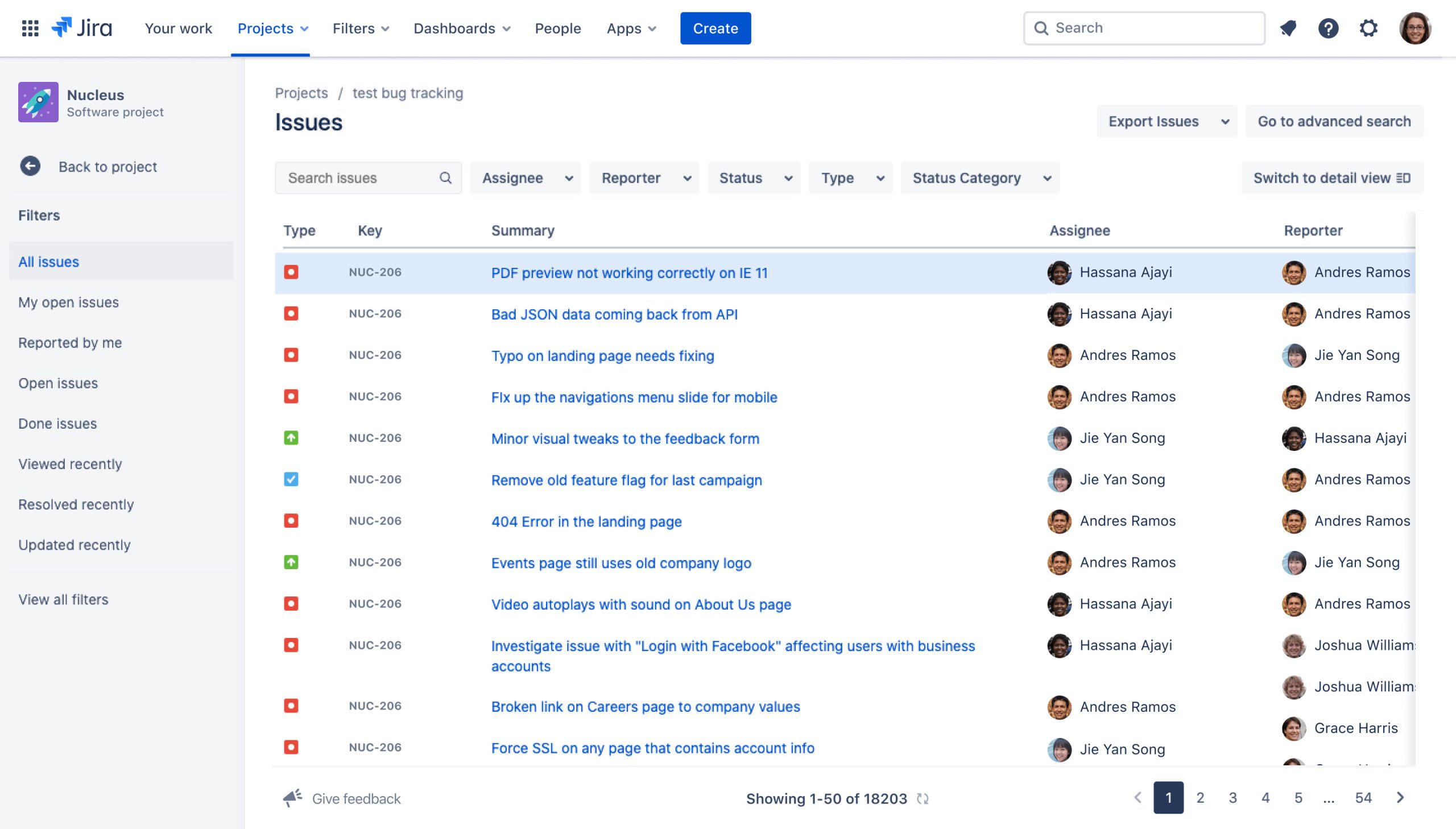
Issue tracking remains one of Jira’s core features.
Teams can create issues for bugs, tasks, feature requests, user stories, improvements, and other types of work. Each issue can contain important information such as its status, priority, assignee, description, comments, and related work.
This creates a centralized record of work and makes it easier for teams to understand what needs to be completed.
2. Scrum and Kanban Boards
Jira supports both Scrum and Kanban workflows.
Scrum boards are useful for teams that organize development work into sprints, while Kanban boards are better suited to continuous workflows where tasks move through different stages.
The visual board format makes it easier to see what is waiting to be started, what is currently being worked on, and what has been completed.
3. Backlog Management
Jira provides backlog functionality for teams that need to organize upcoming work.
Product and engineering teams can prioritize issues, prepare work for upcoming sprints, and maintain a clear list of tasks that still need attention.
A well-managed backlog can help teams avoid losing important ideas or technical tasks while keeping current priorities visible.
4. Timeline Planning
Jira’s timeline views provide a broader picture of project schedules.
Teams can use timelines to plan work across weeks or months, understand dependencies, and identify potential delays.
This can be particularly useful for project managers and product teams that need a high-level view while developers continue working with individual issues.
5. Project Management
Jira can be used to manage projects from initial planning through completion.
Teams can break larger goals into smaller tasks, assign ownership, monitor progress, and connect related work.
The platform also provides templates that can help teams get started with different types of projects and workflows.
6. Workflow Automation
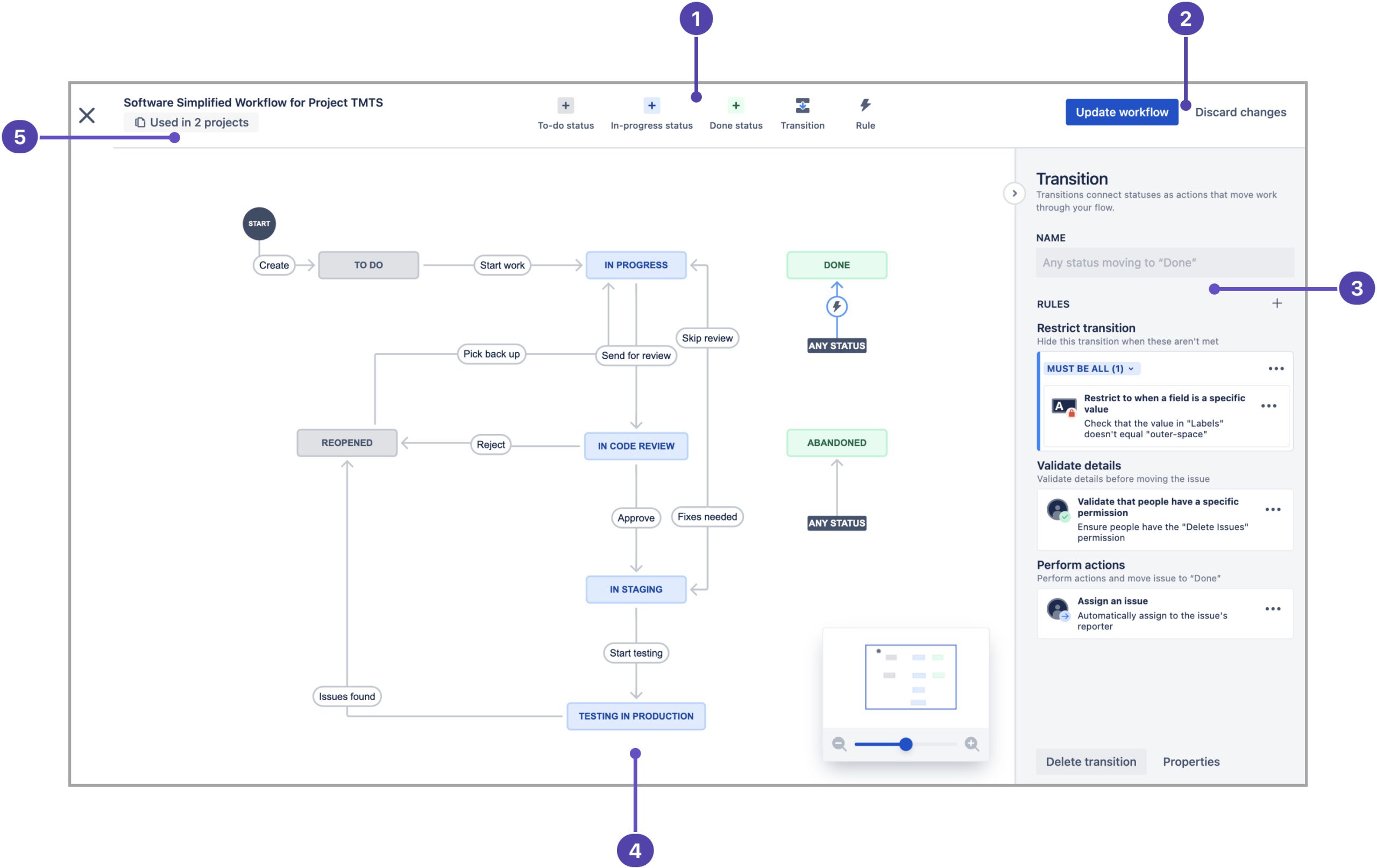
Automation is another major Jira feature.
Teams can create rules that perform repetitive actions automatically. For example, automation can help update statuses, assign work, send notifications, or trigger actions when specific events occur.
This can reduce manual administration and allow team members to spend more time on productive work.
7. Reports and Analytics
Jira provides reporting tools that help teams understand project and development performance.
Teams can monitor progress, identify bottlenecks, review work patterns, and analyze metrics related to their workflows.
These reports can be useful for engineering managers, project managers, and product leaders who need more visibility into team performance.
8. Integrations
Jira can connect with a large ecosystem of third-party applications through the Atlassian Marketplace.
This allows teams to connect Jira with tools used for communication, development, design, documentation, and other business processes. Atlassian says the Marketplace offers more than 3,000 integrations.
9. AI Features
Jira has increasingly incorporated AI capabilities through Atlassian’s Rovo technology.
AI can assist with tasks such as organizing work, creating automations, finding relevant information, summarizing context, and helping teams make decisions.
Atlassian is also expanding usage-based pricing around certain AI and automation capabilities, so teams should pay attention to current usage allowances when evaluating plans.
Jira for Software Development
Jira remains particularly strong for software development.
Engineering teams can use it to manage bugs, user stories, technical tasks, sprints, releases, dependencies, and development workflows.
Developers can also connect Jira with other tools used throughout the software development lifecycle, helping teams maintain a shared view of work and reduce unnecessary context switching.
For Agile teams, Jira can provide a structured environment for planning and tracking development work from backlog to release.
Jira for Product Management
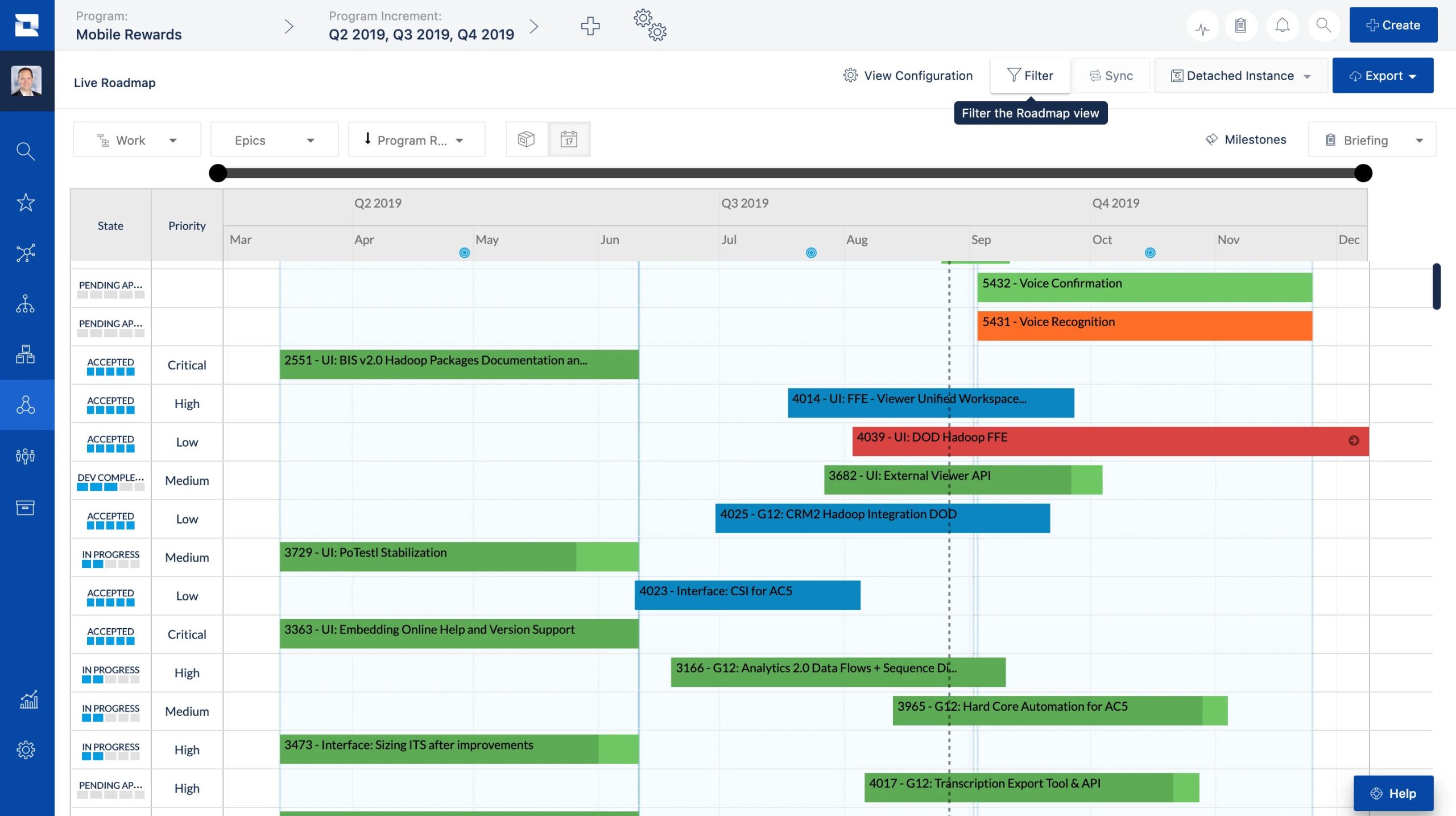
Product managers can use Jira to organize product initiatives, prioritize features, manage roadmaps, and coordinate with engineering teams.
Because product requirements and development tasks can be connected, teams can maintain better visibility between what they plan to build and the work required to deliver it.
This makes Jira useful when product and engineering teams need to work closely together.
Jira Ease of Use
Jira has become easier to use over time, but it can still have a steeper learning curve than simpler project management tools.
The platform offers a large number of features and customization options. This flexibility is valuable for experienced teams, but beginners may initially find the terminology and workflow configuration confusing.
New users may need time to understand concepts such as issues, projects, workflows, boards, backlogs, sprints, and permissions.
Once a team establishes its workflow, however, Jira can become a highly organized and efficient system.
Jira Pros and Cons
Pros
- Powerful issue tracking
- Excellent for Agile development
- Scrum and Kanban support
- Flexible workflows
- Strong project planning tools
- Detailed reporting
- Extensive integrations
- Useful automation
- Scales well with growing teams
Cons
- Can feel complicated for beginners
- Requires setup and workflow configuration
- May be excessive for very simple projects
- Advanced functionality can require higher-tier plans
- Large numbers of customization options can become difficult to manage
Who Is Jira Best For?
Jira is best suited to teams that need structured project management and detailed work tracking.
It is particularly useful for:
Software Teams: Manage bugs, features, user stories, releases, and development tasks.
Agile Teams: Organize Scrum sprints, Kanban workflows, backlogs, and development cycles.
Product Managers: Connect product planning with engineering execution.
Growing Companies: Build workflows that can scale as teams and projects become more complex.
Cross-Functional Teams: Coordinate work between product, engineering, marketing, and other departments.
Jira Pricing

Jira offers a Free plan for smaller teams, while paid Cloud plans provide additional functionality and capabilities. Atlassian’s official licensing information states that Jira Cloud’s Free plan supports up to 10 users and includes 2GB of storage and Community Support. Standard and Premium plans are also available, with Enterprise options for larger organizations.
Jira Cloud pricing can vary based on the number of users and billing arrangement. Monthly subscriptions use progressive per-user pricing, while annual subscriptions are based on user tiers.
Because Atlassian continues to evolve its AI and usage-based pricing model, businesses should check the latest pricing and included allowances before purchasing.
Who Should Avoid Jira?
Jira may not be the best option for individuals or very small teams that only need a simple to-do list or basic task manager.
If your projects are straightforward and don’t require issue tracking, workflows, sprint planning, or detailed reporting, Jira may feel more complicated than necessary.
Teams looking for a lightweight and extremely simple project management experience may prefer tools with fewer configuration options.
Jira vs Other Project Management Tools
Jira’s biggest advantage is its depth.
Compared with lightweight project management tools, Jira provides much more control over workflows, issue types, boards, permissions, automation, reporting, and development processes.
However, that depth also creates a learning curve.
If your team needs advanced project and software-development management, Jira can be a strong choice. If you simply need to assign tasks and check them off, a simpler platform may be more efficient.
Is Jira Worth It in 2026?
Jira is worth considering in 2026 if your team needs a powerful system for project management, issue tracking, Agile development, and workflow automation.
Its combination of Scrum and Kanban boards, backlogs, timelines, reports, integrations, automation, and AI capabilities gives teams a broad set of tools for managing complex work.
The main question is whether your team needs this level of functionality.
For software development and product teams, Jira can provide significant value. For simple personal projects or basic task management, its extensive feature set may be unnecessary.
Final Verdict
Overall, Jira is one of the strongest project management and issue-tracking platforms for software and Agile teams in 2026.
Its powerful issue tracking, flexible workflows, Scrum and Kanban boards, reporting, automation, integrations, and growing AI capabilities make it suitable for teams managing everything from individual tasks to complex development projects.
Its biggest weakness is also its biggest strength: Jira offers a lot of functionality. New users may need time to learn the platform and configure it properly.
If you need a powerful, scalable, and highly customizable project management platform, Jira is definitely worth considering. For software development, product management, and Agile teams, it remains one of the most capable options available.
