
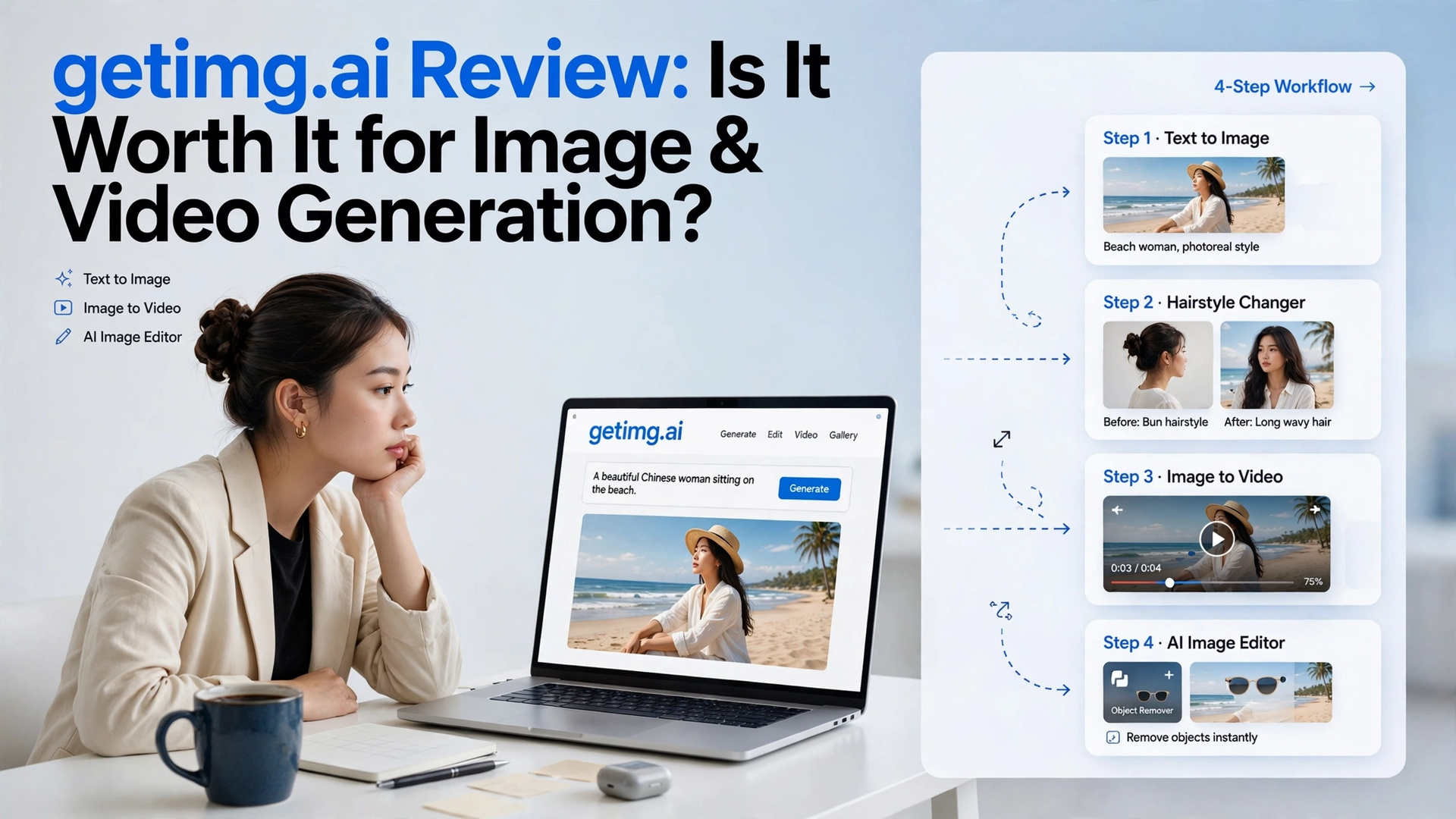

Creating high-quality visuals used to mean opening Photoshop, searching for stock images, hiring a designer, or spending hours editing everything manually. AI has changed that workflow, but the growing number of AI tools has created another problem: you often need a different platform for every creative task.
Getimg.ai is trying to solve that problem with an all-in-one AI creative platform.
Instead of focusing only on text-to-image generation, Getimg.ai brings together AI image generation, photo editing, image-to-video creation, upscaling, and other creative tools. It also provides access to different AI models, giving users more flexibility when creating visual content.
But having lots of features doesn’t automatically make a platform useful.
So, what is Getimg.ai actually like to use in 2026? Is the image generator good enough for professional-looking content? How useful is its AI image editor? And can its video tools really turn still images into convincing videos?
This Getimg.ai Review 2026 takes a closer look at the platform, its features, pricing, strengths, limitations, and overall workflow.
What Is Getimg.ai?

Getimg.ai is a browser-based AI creative platform that lets users generate, edit, enhance, and animate visual content.
The service originally became known for AI image generation, but its feature set has expanded considerably. Today, users can work with text prompts and existing images to create a variety of visual assets.
Some of the platform’s main capabilities include:
- Text-to-image generation
- AI-powered image editing
- Image-to-video generation
- AI image upscaling
For bloggers, content creators, marketers, designers, and small businesses, that can be a significant convenience.
Getimg.ai Features at a Glance
Before getting into the individual tools, here’s a quick overview of what Getimg.ai brings together.
| Feature | What It Does |
|---|---|
| AI Image Generator | Creates images from text prompts |
| AI Image Editor | Modifies existing images using AI |
| Image-to-Video | Animates still images into short videos |
| AI Upscaler | Increases image resolution |
| Hairstyle Editing | Changes hairstyles and hair appearance |
| Multiple Models | Provides different AI generation options |
| Prompt-Based Editing | Lets users describe changes in natural language |
| Browser-Based Tools | Keeps the creative workflow online |
The variety is one of Getimg.ai’s biggest selling points. However, the quality and usefulness of each tool can vary depending on what you’re trying to create.
Getimg.ai AI Image Generator Review

The image generator is arguably the foundation of the platform.
The basic workflow is simple. You describe the image you want, choose your preferred settings or model, and generate the result.
For example, a travel creator might enter:
“A cinematic travel photograph of a woman sitting beside a peaceful tropical beach at sunrise, wearing a white linen shirt, realistic skin texture, soft natural lighting, gentle ocean waves, professional travel photography, wide composition with empty space for headline text.”
A prompt like this gives the AI information about the subject, environment, lighting, style, and composition without requiring complicated technical language.
How Good Are the Generated Images?
For common creative tasks, Getimg.ai can produce visually appealing results.
The tool can be useful for creating:
- Blog featured images
- Social media graphics
- YouTube thumbnails
- Marketing visuals
- Advertising concepts
You don’t necessarily need to understand advanced prompt engineering before creating your first image.
However, more specific requirements usually benefit from more detailed prompts. If you need a particular composition, camera angle, expression, outfit, lighting setup, or visual style, adding those details gives the model more information to work with.
Getimg.ai Image Editing
Generating an image from scratch is only part of the creative process.
Sometimes you already have an image that is almost right but needs a few changes. This is where the Getimg.ai image editor becomes useful.
You can upload an image and describe what you want to modify.
For example:
“Replace the background with a modern luxury hotel lobby while keeping the person, clothing, and pose similar.”
The AI attempts to make the requested changes without requiring you to manually perform every editing step.
This approach can save considerable time for simple creative edits.
What Can You Edit?
Depending on the workflow, AI editing can be useful for:
- Replacing backgrounds
- Removing unwanted objects
- Modifying visual elements
- Changing colors
- Creating variations
Instead of learning complicated editing software, you explain the desired change and let the AI attempt it.
The Main Limitation
AI image editing isn’t always perfectly isolated.
If you ask the system to change one part of an image, it may occasionally alter another part as well. Lighting, shadows, facial details, colors, or background elements can shift slightly.
That’s not necessarily a problem for social media content or creative experimentation.
For professional projects where the original image must remain extremely consistent, however, you’ll probably want to inspect the result carefully before using it.
Getimg.ai Hairstyle Changer
Portrait editing is another interesting application of Getimg.ai.
You can upload a photograph and use a text instruction to experiment with a different hairstyle or hair color.
For example:
“Change the hairstyle to long, soft blonde curls while keeping the person’s face and clothing consistent.”
This can be useful for:
- Hairstyle experimentation
- Beauty content
- Fashion concepts
- Character development
- Social media posts
- Portrait variations
A clear, front-facing portrait usually gives the AI more information than a dark photograph, side profile, or image where most of the hair and face are obscured.
It’s also worth remembering that generative editing can sometimes make subtle changes to the surrounding image.
Getimg.ai Image-to-Video Generator

One of the more ambitious parts of Getimg.ai is its AI video functionality.
Image-to-video generation takes a static picture and attempts to introduce movement based on a prompt.
For example, you could start with a beach image and use:
“The woman looks toward the ocean while her hair moves gently in the sea breeze. The camera slowly moves forward.”
The AI then tries to create a short animated sequence.
This opens up interesting possibilities for creators who have plenty of still images but need motion-based content.
Where Image-to-Video Works Well
The feature can be useful for:
- Short-form social videos
- Reels
- TikTok content
- YouTube Shorts
Where It Can Struggle
AI video generation is considerably more complicated than generating a still image.
The model needs to create movement while maintaining the appearance of the original subject.
This means you may occasionally see:
- Changes in facial features
- Different hair appearance
- Unnatural body movement
- Background distortion
If you’re making casual social content, that experimentation may be acceptable. If you need precise character consistency across a large video project, you’ll want to evaluate the video capabilities carefully.
Getimg.ai AI Upscaler
Low-resolution images can be difficult to use for websites, advertising, print materials, and large displays.
Getimg.ai also provides AI-powered upscaling designed to increase image resolution and reconstruct visual details.
This can be helpful when:
- An old image is too small
- A generated image needs a larger output
- A thumbnail needs to be repurposed
- A visual needs additional resolution
- You want to prepare an image for another workflow
Getimg.ai Models
Another reason users may consider Getimg.ai is its support for different AI models.
Different models can produce noticeably different results from the same prompt. One may be better suited to photorealistic images, while another may produce a particular artistic style or handle certain subjects differently.
For beginners, this can create a small learning curve.
At first, having multiple options can make it difficult to know which model to select. After some experimentation, however, model choice can become an advantage.
Instead of being locked into a single generation system, you have more room to experiment with different approaches.
Is Getimg.ai Easy to Use?
For basic image generation, Getimg.ai is relatively easy to understand.
The typical workflow is:
- Open the platform and create an account.
- Select the creative tool you want to use.
- Enter a prompt or upload an image.
- Select the appropriate model and settings.
- Generate the content.
- Review the result.
- Refine or regenerate it if necessary.
- Save the finished visual.
The learning curve becomes more noticeable once you start using multiple models, image editing, advanced settings, and video generation.
Getimg.ai Pros and Cons
Pros
- Simple text-to-image workflow
- Multiple AI models
- AI-powered photo editing
- Image-to-video functionality
- AI upscaling
- Hairstyle and portrait editing
- Useful for marketing visuals
- Suitable for social media content
- Several creative tools in one platform
- Natural-language prompting
- Browser-based workflow
Cons
- AI video results can be inconsistent
- Character consistency may change between generations
- Video experimentation can consume credits quickly
- Some edits may affect unintended parts of an image
- Different models require experimentation
- Advanced workflows have a learning curve
- Professional projects may still require traditional editing software
Getimg.ai Pricing 2026

Getimg.ai uses a credit-based pricing system.
The plans listed for 2026 include:
| Plan | Price When Billed Yearly | Credits |
|---|---|---|
| Entry | $8/month | 3,000 |
| Core | $25/month | 15,000 |
| Plus | $55/month | 35,000 |
| Ultra | $150/month | 100,000 |
The amount of content you can create from those credits depends on the tools and settings you use.
This is especially important when comparing image and video generation.
A creator who mostly generates static images may be able to make significantly more content from a credit allowance than someone who repeatedly generates video clips.
The higher plans provide more credits and are designed for users with heavier creative workloads.
Since AI platforms frequently change pricing, credits, models, and plan benefits, check the current pricing information before subscribing.
Getimg.ai for Content Creators
Getimg.ai can be particularly useful for content creators because a single project can require several different types of assets.
Imagine you’re creating a travel article.
You might need:
- A hero image for the article
- Social media graphics
- Portrait variations
- Background images
- Thumbnail concepts
- Short animated clips
That convenience is one of the strongest reasons to consider the platform.
Getimg.ai for Marketers and Small Businesses
Businesses can also use AI-generated visuals for early-stage marketing and content production.
For example, marketers can experiment with:
- Ad concepts
- Product visuals
- Social media campaigns
- Promotional graphics
- Blog illustrations
- Creative variations
- Presentation visuals
However, businesses should always review the platform’s current licensing and commercial-use terms before using generated assets in important commercial campaigns.
Getimg.ai vs Other AI Creative Platforms
Getimg.ai is not simply competing with traditional AI image generators.
Its broader feature set places it in competition with AI creative suites that combine multiple types of generation and editing.
| Category | Getimg.ai |
|---|---|
| AI image generation | Yes |
| AI photo editing | Yes |
| Image-to-video | Yes |
| Image upscaling | Yes |
| Portrait editing | Yes |
| Multiple models | Yes |
| Beginner-friendly workflow | Yes |
| Advanced video specialization | More limited compared with dedicated video platforms |
The platform’s main appeal is therefore convenience rather than specialization in a single creative format.
Who Might Not Need Getimg.ai?
Not everyone needs an all-in-one AI creative platform.
If you only generate a handful of images each month, a simpler image-generation service may be enough.
Likewise, if video production is your primary requirement, you may want to focus your research on platforms designed specifically around AI video.
Getimg.ai makes more sense when you can actually use several of its tools.
Is Getimg.ai Worth It in 2026?
Getimg.ai’s value largely depends on how you create content.
If you want a single platform for AI image generation, image editing, upscaling, portrait modifications, and occasional video creation, its broad feature set can be convenient.
The image-generation side is probably the easiest place to start. You can describe an idea in natural language and refine the output without needing extensive technical knowledge.
The video functionality is more experimental. While it can produce interesting animated clips, you shouldn’t assume every generation will be ready to publish. Character consistency and motion quality can vary, and multiple attempts may be necessary.
The credit system is another factor to consider. Heavy users should pay attention to how quickly their normal workflow consumes credits, particularly if they generate a lot of video.
Final Thoughts
After exploring the different capabilities available through Getimg.ai, I think its biggest advantage is the combination of creative tools in one workflow.
It isn’t limited to generating an image from a prompt. You can create visuals, edit existing images, experiment with portraits, upscale content, and explore image-to-video generation.
That makes the platform appealing to creators who regularly produce different types of digital content.
At the same time, having many tools doesn’t mean every feature will outperform a dedicated specialist platform. AI image editing can occasionally change details you wanted to preserve, and video generation can require several attempts before producing the desired result.
For creators who primarily need AI images with additional editing and occasional video capabilities, Getimg.ai is an interesting platform to explore in 2026.
The best way to evaluate it is to match its tools and credit system against your own workflow rather than focusing only on the number of features included.
