
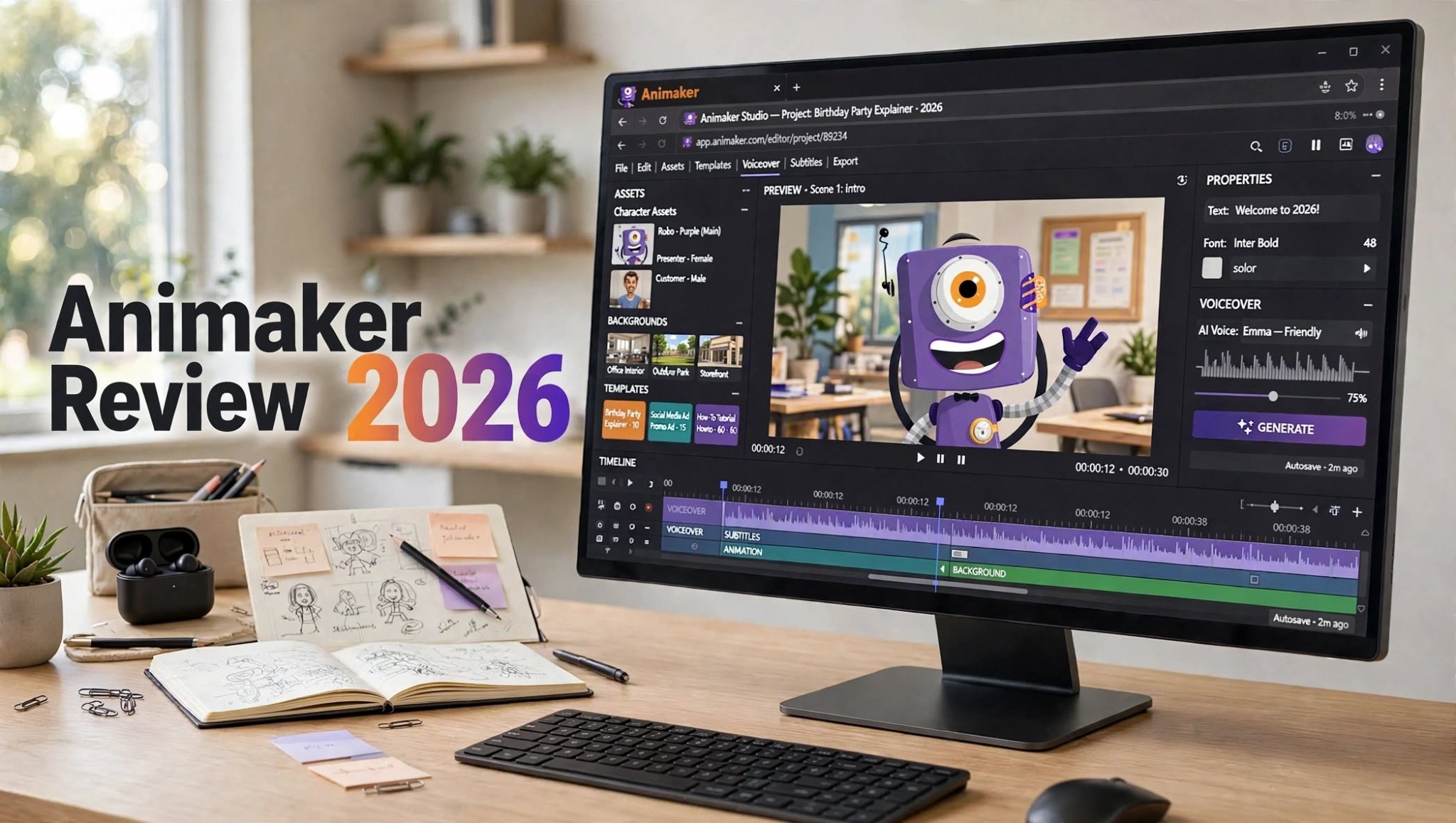

Creating an animated video used to mean learning complicated animation software, managing timelines, and spending hours building scenes from scratch. Animaker takes a much simpler approach. It combines templates, characters, animation tools, voiceovers, stock assets, and AI-powered features in a browser-based video creation platform.
After looking at how Animaker is designed and who it is best suited for, I found that its biggest strength is accessibility. You do not need to be a professional animator to create an explainer, training video, presentation, classroom lesson, or simple marketing video.
However, Animaker is not designed to replace every modern AI video generator. If your goal is cinematic text-to-video generation, highly realistic scenes, or advanced AI filmmaking, you may want a different type of platform.
So, is Animaker worth using in 2026? In this review, I’ll break down its features, workflow, pricing considerations, advantages, limitations, and the types of creators who can get the most from it.
What Is Animaker?

Animaker is an online video and animation creation platform designed for individuals, educators, marketers, businesses, and teams.
Instead of requiring users to build every animation element manually, the platform provides ready-made templates, characters, backgrounds, props, scenes, effects, and other assets that can be customized.
You can create different types of content, including:
- Animated explainer videos
- Business presentations
- Training videos
- Educational content
- Product demonstrations
That distinction is important. Animaker is primarily an animation and video creation platform. It is not simply an AI prompt box where you describe a cinematic scene and receive a finished movie.
My Experience With the Animaker Workflow
What makes Animaker approachable is the guided workflow.
Rather than opening an empty professional animation timeline and wondering where to begin, I can start with a template or build a scene using the available assets.
A typical workflow looks something like this:
- Choose a video format or template.
- Select scenes and backgrounds.
- Add characters and objects.
- Customize text and visual elements.
- Add animation and transitions.
- Create or add a voiceover.
- Add subtitles when needed.
- Preview the project.
- Make final adjustments.
- Export the finished video.
The trade-off is that a guided workflow can sometimes feel restrictive. The more I move away from Animaker’s intended use cases, the more I notice that the platform is built around structured animation rather than unrestricted visual experimentation.
Animaker at a Glance
| Feature | My Take |
|---|---|
| Platform | Browser-based animation and video maker |
| Best for | Explainers, training, education, presentations, business videos |
| Beginner friendly | Yes |
| Templates | Extensive selection |
| Character animation | One of its core strengths |
| AI features | Available for several parts of the workflow |
| Voiceovers | Supported |
| Subtitles | Supported |
| Free option | Available with limitations |
| Advanced filmmaking | Not its main focus |
| Learning curve | Relatively low |
The main idea behind Animaker is simple: make animated video creation accessible without requiring traditional animation skills.
Animaker Features
1. Animated Video Maker
The core Animaker experience revolves around creating animated videos from scenes, characters, objects, text, and other visual elements.
This makes the platform particularly useful for explainer-style content.
For example, if I wanted to explain how a software product works, I could create a character-based sequence showing a problem, introduce the solution, and then demonstrate the main benefits.
That is much easier than creating the same type of animation entirely from scratch.
2. Templates

Templates are one of Animaker’s biggest time-saving features.
Instead of designing an entire video from an empty project, I can start with a prebuilt structure and modify it to match my message.
Templates can be useful for:
- Business presentations
- Product explainers
- Educational videos
- Training content
If too many original elements remain unchanged, the finished video can feel like a generic template. Customizing colors, characters, scenes, typography, timing, and messaging can make a significant difference.
3. Character Builder
Character-based animation is another important part of the Animaker experience.
Characters can be customized and used throughout a video to create a consistent visual story.
This works particularly well for:
- Employee training
- Educational lessons
- Product explainers
- Customer-service videos
The cartoon-oriented visual style will not suit every project, but for straightforward communication, it can make otherwise boring information easier to follow.
4. AI-Powered Tools
Animaker has incorporated AI into different parts of the content creation process.
AI-assisted features can help reduce some of the manual work involved in producing video content.
Depending on the workflow, AI can be useful for areas such as:
- Script generation
- Voice generation
- Translation
- Subtitles
- Content creation assistance
Still, I would treat AI-generated content as a starting point rather than a finished production. Scripts, pronunciation, timing, and subtitles should always be reviewed before publishing.
5. AI Voiceovers
Voiceover production can be one of the more time-consuming parts of video creation.
Animaker’s voice-related tools make it possible to add narration without recording everything manually.
That can be useful for educational videos, explainers, tutorials, and multilingual content.
For short videos, AI narration can save considerable time. For longer or highly emotional content, however, the naturalness of the voice becomes more important, so I would always listen to the complete narration before exporting.
6. Subtitles and Captions
Captions are important for accessibility and social media viewing.
Animaker supports subtitle-related functionality that can make it easier to turn spoken content into a more viewer-friendly format.
This is especially useful when creating:
- Tutorials
- Educational videos
- Social content
- Training material
- Product explainers
7. Stock Assets
A major advantage of using an all-in-one animation platform is having visual assets available within the same workflow.
Instead of constantly switching between different websites to find backgrounds, objects, characters, and other elements, creators can build much of the video within Animaker.
This keeps the workflow relatively straightforward and is one reason the platform can work well for beginners and business teams.
What I Like About Animaker

Beginner-Friendly Workflow
Animaker does a good job of making animation less intimidating.
Someone who has never worked with professional animation software can understand the basic concept quickly: select a scene, add elements, customize them, animate them, and move to the next scene.
That simplicity is valuable.
Templates Speed Up Production
Templates can dramatically reduce the amount of initial work required to create a video.
For businesses that regularly need explainers, training content, or internal communication, starting from a proven structure can be more efficient than creating every scene from zero.
Good for Explainer Videos
This is probably where Animaker makes the most sense.
If I need to explain a product, process, service, or concept, animation can communicate the information more effectively than a wall of text.
Animaker provides the characters, scenes, text, and visual elements needed to build that type of content.
Useful for Education and Training
Teachers, trainers, HR teams, and businesses can benefit from animated content because complex information can be broken into short visual scenes.
A character demonstrating a process can sometimes communicate an idea more clearly than several paragraphs of written instructions.
Everything Is in One Workflow
Being able to handle animation, characters, assets, narration, subtitles, and editing from one platform reduces the need to constantly move between different applications.
That is particularly convenient for small teams.
Where Animaker Could Be Better

Some Results Can Look Template-Based
The same feature that makes Animaker easy to use can also become a limitation.
Templates provide structure, but structure can sometimes reduce originality.
If I use the default characters, scenes, transitions, and layouts without much customization, the final video may look similar to other template-driven content.
Creators who care heavily about a distinctive visual identity will need to spend additional time customizing their projects.
It Is Not a Full Cinematic AI Video Generator
This is probably the biggest distinction to understand.
Animaker is excellent for structured animation, but that does not mean it is the ideal platform for every type of AI video generation.
If my goal is to create photorealistic cinematic shots from text prompts, generate sophisticated image-to-video sequences, or experiment with highly stylized AI filmmaking, I would look at dedicated generative video platforms instead.
Animaker’s strength is controlled animated communication, not unlimited cinematic generation.
Advanced Projects Can Require More Manual Work
Simple projects are relatively straightforward.
As a project becomes longer and more complicated, however, there are more scenes, timings, characters, transitions, voiceovers, and individual elements to manage.
At that point, creating a polished result can still require considerable editing.
The Free Experience Has Limitations
A free plan is useful for testing the platform and understanding how the editor works.
However, creators should check the current plan restrictions before building a project intended for professional publication. Free tiers of video platforms commonly have restrictions around exports, assets, resolution, or branding.
For serious commercial work, the available paid plans may be more practical.
Animaker Pros and Cons
Pros
- Beginner-friendly animation workflow
- Large selection of templates
- Useful character-based animation
- Good for explainer videos
- Helpful for education and training
- AI-assisted content features
- Voiceover functionality
- Subtitle and caption tools
- Browser-based editing
- Suitable for business teams
Cons
- Some videos can feel template-driven
- Cartoon style is not suitable for every brand
- Advanced projects can take time to polish
- Not primarily designed for cinematic AI video
- Free usage comes with restrictions
- Professional users may need paid features
- Highly original visual styles require more customization
Who Should Use Animaker?
Animaker makes the most sense for people who prioritize simplicity, speed, and structured animation.
Small Businesses
Small businesses can use animated videos to explain services, introduce products, train employees, or communicate internal information.
Marketers
Marketers can create simple promotional videos, product explainers, social content, and presentation material without hiring a full animation team for every project.
Teachers and Educators
Educational content is a natural fit for Animaker. Characters and visual scenes can make lessons more engaging and easier to understand.
HR and Training Teams
Companies can create onboarding videos, employee training material, policy explainers, and internal communication content.
Beginners
If you have never created an animated video before, Animaker provides a much gentler starting point than professional animation applications.
Who Might Want Something Else?
Animaker may not be the ideal fit if your main goal is:
- Photorealistic AI video
- Cinematic filmmaking
- Advanced image-to-video generation
- Highly experimental visual styles
- Professional film production
- Maximum control over every animation detail
Animaker vs Traditional Animation Software
The biggest difference is accessibility.
Traditional animation software can provide extremely detailed control, but that control often comes with a steeper learning curve.
Animaker takes the opposite approach.
It gives users prebuilt components and a more guided workflow so they can concentrate on the message rather than learning every technical aspect of animation.
That makes it particularly attractive for non-designers.
The trade-off is that highly experienced animators may eventually want more control than a template-focused platform provides.
Animaker Pricing and Free Plan

One of the first things I would check before committing to Animaker is the current pricing structure.
The platform provides a free way to explore its capabilities, but free access is designed more for experimentation than for every type of professional production.
Depending on the plan, users may receive different levels of access to features, assets, exports, and other capabilities.
Because SaaS pricing and plan benefits can change, I recommend checking the current Animaker pricing page immediately before purchasing rather than relying on an old price from a review.
For occasional users, the free option may be enough to learn the editor. For businesses or creators producing videos regularly, a paid subscription can make more sense if it removes the limitations that affect their workflow.
Is Animaker Good for YouTube Videos?
It can be.
Animaker works particularly well for YouTube channels built around:
- Educational explainers
- Animated tutorials
- Business content
- Character storytelling
- How-to videos
- Presentation-style videos
The script, narration, editing pace, thumbnail, topic, storytelling, and audience all matter.
Animaker can provide the production foundation, but the creator still needs to make the content interesting.
Is Animaker Good for Business?
Yes, business communication is one of the areas where Animaker makes practical sense.
A company does not always need a cinematic production.
Sometimes the objective is simply to explain a process, introduce a service, train an employee, or show customers how something works.
For these purposes, animated characters and visual scenes can be very effective.
Animaker vs AI Video Generators
This comparison is important because the video-generation market has changed considerably.
Animaker is primarily built around creating and editing structured animated content.
AI video generators generally focus more on generating visual footage from prompts, images, or other references.
So the right choice depends on the project.
| Need | Animaker |
|---|---|
| Animated explainer | Strong fit |
| Training video | Strong fit |
| Classroom animation | Strong fit |
| Character storytelling | Strong fit |
| Business presentation | Strong fit |
| Template-based animation | Strong fit |
| Photorealistic AI video | Less suitable |
| Cinematic text-to-video | Not its main strength |
| Image-to-video experimentation | Look at dedicated AI video tools |
| Traditional animation control | Depends on project complexity |
This is why I would not judge Animaker simply by comparing it with every AI video generator available today. They are often solving different problems.
My Final Verdict: Is Animaker Worth It?
Animaker is worth considering if you want an accessible way to create animated videos without becoming a professional animator.
Its biggest advantages are its templates, characters, browser-based workflow, voiceover capabilities, AI-assisted features, and focus on making animation approachable.
For explainer videos, education, training, HR, presentations, onboarding, and simple marketing content, the platform can be a practical choice.
But it has limitations.
The template-driven approach can make some videos feel less distinctive, and it is not the platform I would choose when my main objective is photorealistic or cinematic AI video generation.
My overall takeaway is simple:
Choose Animaker when your priority is structured, beginner-friendly animation. Look beyond Animaker when your priority is cinematic AI-generated video or highly experimental visual creation.
The best tool depends on the type of video you actually need to produce.
Frequently Asked Questions
What is Animaker used for?
Animaker is used to create animated videos, presentations, explainers, educational content, training videos, marketing videos, and business communication.
Is Animaker good for beginners?
Yes. Its templates, characters, ready-made assets, and browser-based workflow make it relatively easy for beginners to start creating animated videos.
Does Animaker have AI features?
Yes. Animaker includes AI-assisted capabilities across areas such as content creation, voiceovers, translation, and subtitles. The exact features available can depend on the current plan.
Can I make YouTube videos with Animaker?
Yes. Animaker can be used for educational videos, animated explainers, tutorials, business videos, and other YouTube formats.
