


Linear is a modern project management and issue-tracking platform built mainly for software development, product, and technology teams. It brings issues, projects, cycles, roadmaps, team collaboration, and product planning into one streamlined workspace.
While many project management tools try to serve every type of business, Linear takes a more focused approach. Its interface is designed around speed, simplicity, and efficient workflows, making it particularly appealing to developers, product managers, startups, and engineering teams.
In this Linear review, we’ll explore its key features, pricing, advantages, limitations, ease of use, and overall value to help you decide whether Linear is the right project management platform for your team in 2026.
What Is Linear?

Linear is a project and issue management platform designed to help teams plan, build, and track products. It combines issue tracking with project management and product planning, allowing teams to manage work without relying on multiple disconnected systems.
Users can create issues, assign tasks, organize projects, plan cycles, set priorities, track progress, and collaborate with teammates from a centralized workspace.
One of Linear’s biggest selling points is its speed. The platform has a clean interface with keyboard shortcuts and streamlined navigation, allowing experienced users to move through their workflow quickly.
It is especially useful for:
- Software development teams
- Product managers
- Engineering departments
- Startups
- Technology companies
- Product and design teams
- Agile development teams
Linear Key Features
1. Issue Tracking
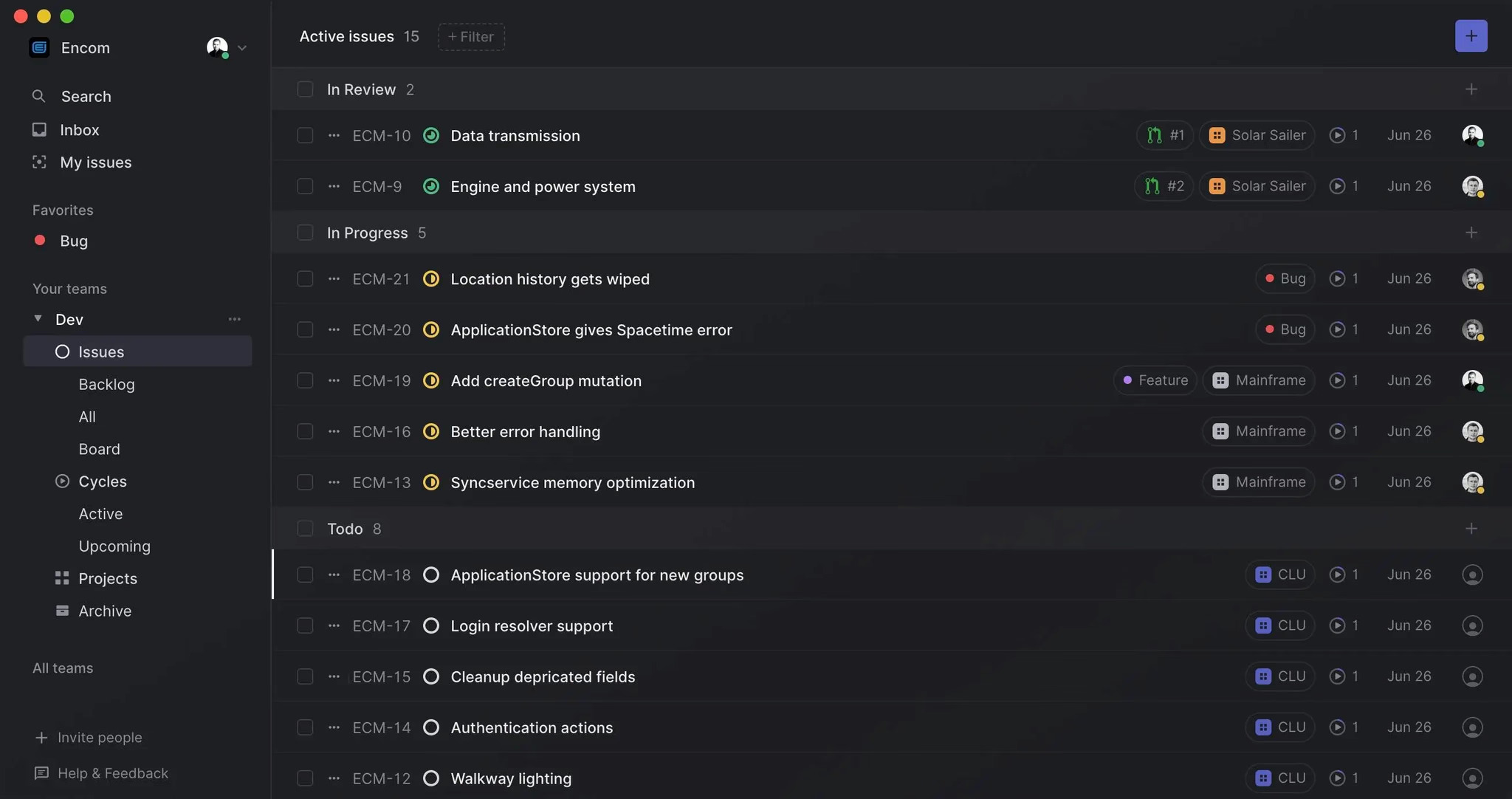
Issue tracking is at the heart of Linear. Teams can create individual issues for bugs, feature requests, improvements, tasks, and other pieces of work.
Each issue can include information such as its status, priority, assignee, labels, comments, and related projects.
This makes it easier to understand what needs to be done, who is responsible for it, and where the work currently stands.
2. Project Management
Linear allows teams to organize individual issues into larger projects. This is useful when working on major features, product launches, engineering initiatives, or other long-term goals.
Projects provide teams with a broader view of their work while still allowing them to manage individual tasks at a detailed level.
3. Cycles for Sprint Planning
Linear uses cycles to help teams organize work into focused development periods. Teams can decide which issues should be completed during a particular cycle and monitor progress as the cycle moves forward.
This approach works particularly well for engineering teams that already use sprint-based or agile development processes.
4. Product Roadmaps
Product teams can use Linear to plan upcoming work and maintain a clearer product roadmap.
Roadmaps can help connect individual projects and development tasks with larger product objectives. This gives product managers and stakeholders a better understanding of what the team is building now and what is planned for later.
5. Priorities and Labels
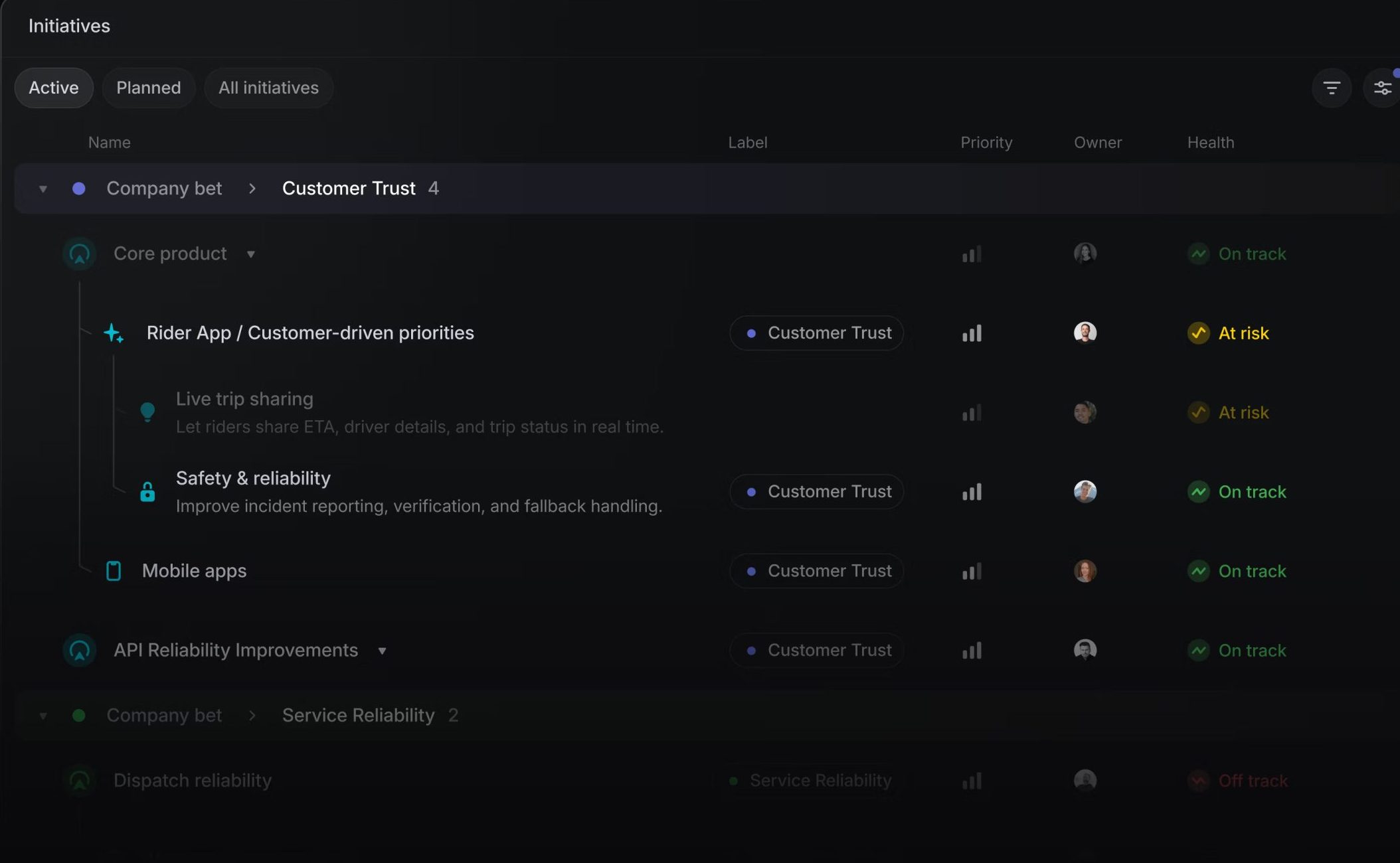
Linear provides organizational tools such as priorities and labels to help teams categorize and filter their work.
For example, teams can distinguish between bugs, improvements, urgent issues, and feature requests. Priorities can also help team members determine which tasks deserve attention first.
6. Team Collaboration
Collaboration is built directly into the workflow. Team members can communicate through comments, updates, and discussions attached to issues and projects.
Keeping conversations connected to specific work items can reduce the need to search through separate communication channels to understand why a task was changed or what needs to happen next.
7. Keyboard Shortcuts
Keyboard shortcuts are one of Linear’s standout features.
Instead of navigating through multiple menus for everyday actions, users can use shortcuts to create issues, change statuses, move between projects, search for work, and perform other common actions.
This can significantly improve productivity for experienced users who spend a large part of their day inside the platform.
8. Integrations
Linear can work alongside other tools commonly used by software and product teams. Integrations help teams connect their development, communication, and productivity workflows.
This is particularly useful for companies that don’t want their project management system to exist completely separately from their existing development environment.
Linear User Experience
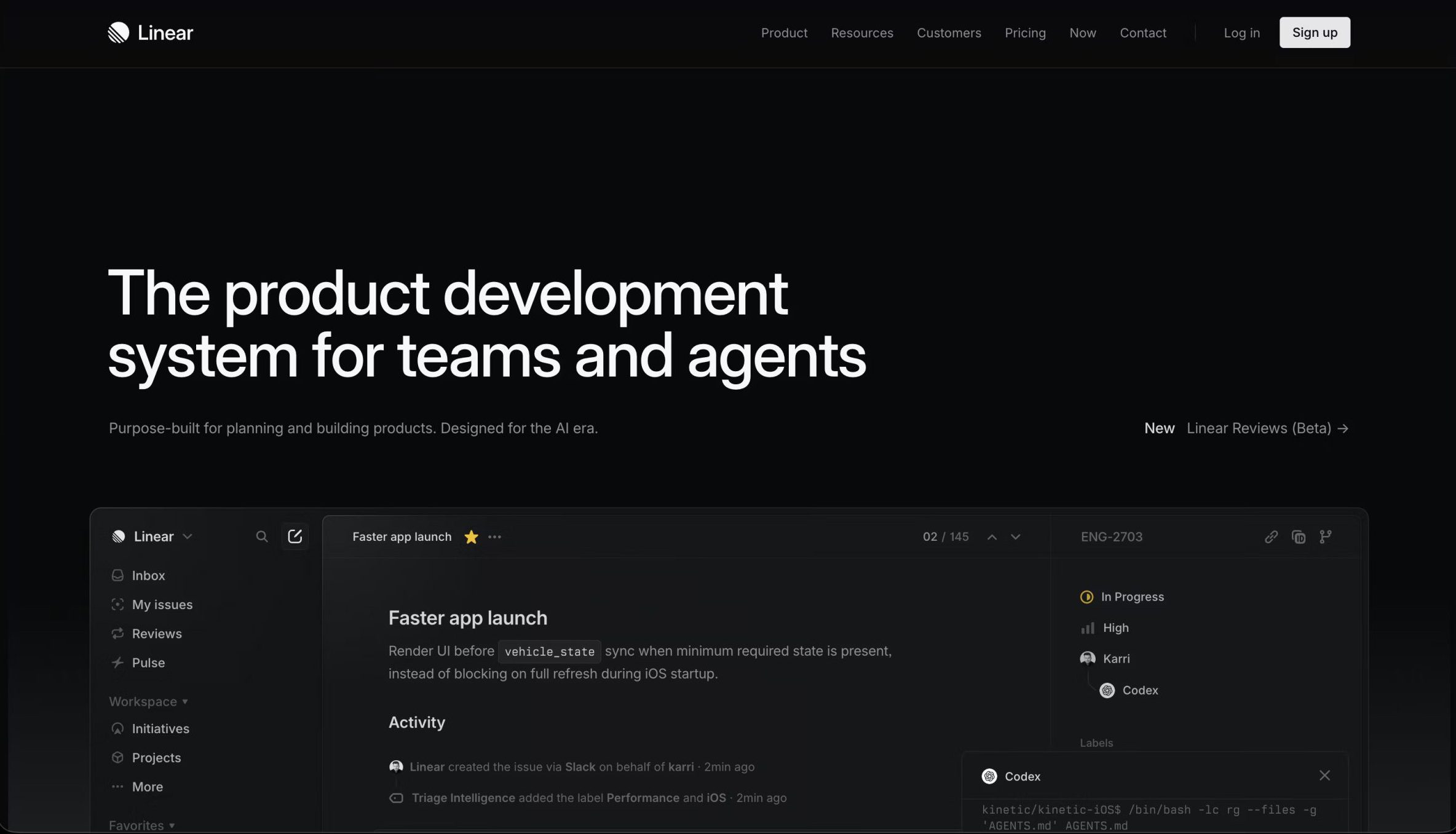
One of Linear’s strongest advantages is its user interface.
The platform feels modern, clean, and responsive. Instead of presenting users with a large number of complicated menus, Linear keeps the main workflow relatively focused.
The minimalist design can make everyday task management feel less cumbersome. However, new users may need some time to understand how Linear organizes issues, projects, cycles, and other components.
Once the workflow becomes familiar, many users can move through the platform very quickly.
Linear for Software Development Teams
Linear is particularly strong for software development teams because its workflow is closely aligned with how engineering teams manage work.
Developers can track bugs, feature requests, technical tasks, and improvements while product managers can manage larger projects and roadmaps.
This creates a connection between product planning and engineering execution. Instead of maintaining separate systems for high-level product planning and day-to-day development work, teams can keep much of their workflow within Linear.
Linear for Product Managers
Product managers can use Linear to organize product initiatives, prioritize upcoming work, and communicate progress with engineering and design teams.
The combination of projects, issues, cycles, and roadmaps makes it possible to move from a high-level product idea to individual actionable tasks.
For product teams that prefer a focused and structured environment, this can be a major advantage.
Linear Pros and Cons
Pros
- Clean and modern interface
- Very fast and responsive
- Excellent issue tracking
- Strong project organization
- Useful cycles for sprint planning
- Product roadmap capabilities
- Powerful keyboard shortcuts
- Good fit for engineering teams
- Helps reduce project management complexity
Cons
- Primarily designed around technical and product teams
- Beginners may need time to learn the workflow
- May not suit every department in a large organization
- Some advanced features may require paid plans
- Less focused on traditional business project management
Linear Pricing
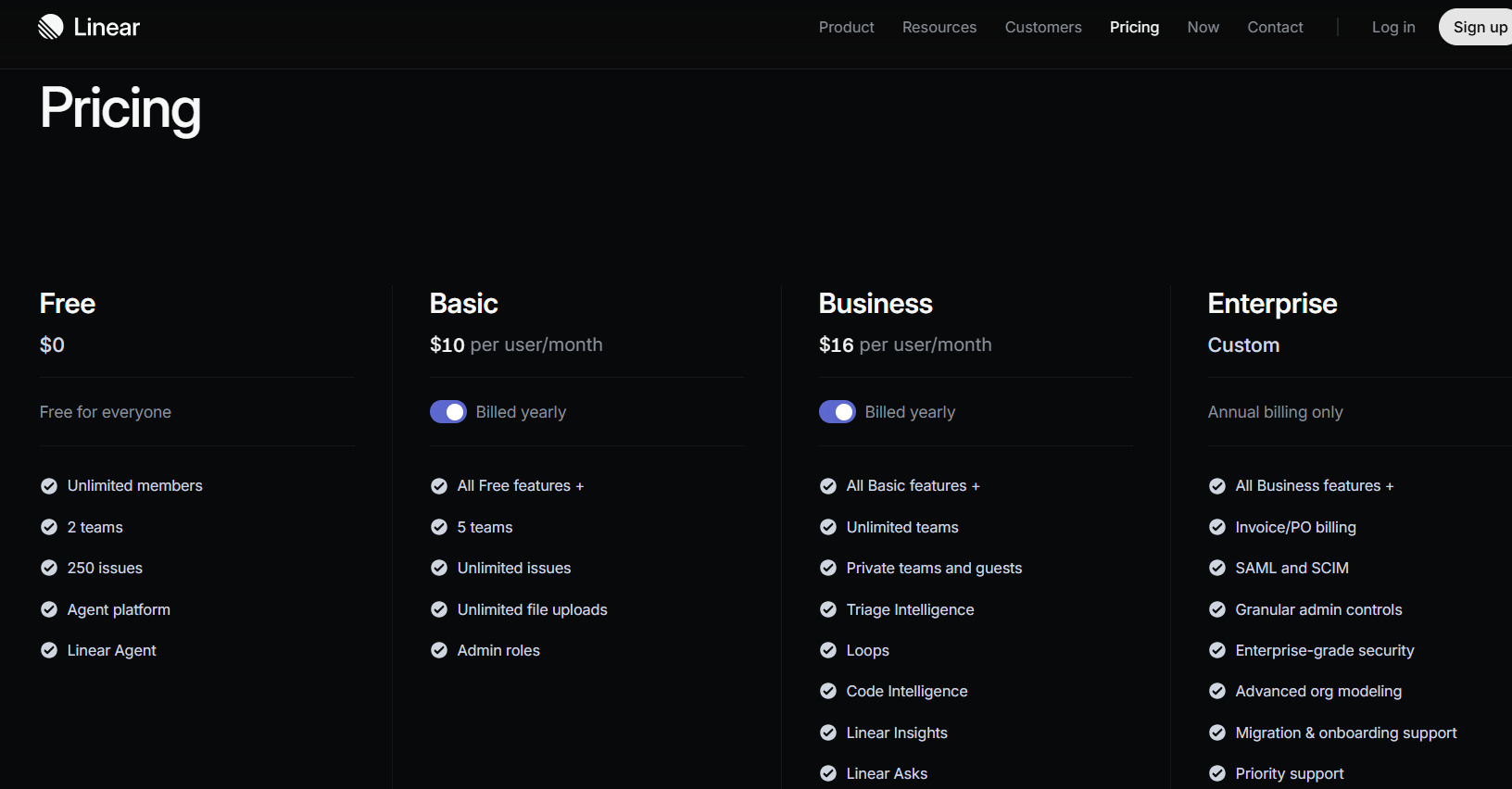
Linear offers different plans designed for different team requirements. The available features and pricing can vary depending on the plan and may change over time.
Teams can generally evaluate the platform through its available entry-level options before deciding whether they need additional functionality for larger or more advanced workflows.
For businesses, pricing should be evaluated alongside team size, required features, collaboration needs, and administrative requirements rather than simply comparing the monthly cost with another project management platform.
Who Should Use Linear?
Linear is best suited to teams that value speed, organization, and a developer-friendly workflow.
It can be a strong choice for startups and technology companies where product managers, engineers, and designers need to work closely together.
Software teams managing bugs, features, releases, and development cycles are likely to get the most value from the platform.
On the other hand, organizations looking for extensive resource management, accounting functionality, HR workflows, or highly customized business processes may find a general-purpose platform more suitable.
Is Linear Easy to Use?
Linear is relatively easy to use once its workflow is understood. The interface is less cluttered than many traditional project management applications, which can make navigation faster.
However, the platform is designed around concepts that may be unfamiliar to users coming from simpler task-management applications.
New users may need a short learning period to understand how issues, projects, cycles, teams, and roadmaps work together.
After that initial learning curve, Linear’s streamlined interface can make everyday project management much more efficient.
Linear vs Other Project Management Tools
Linear stands out because it doesn’t try to be everything for everyone.
Traditional project management platforms often provide a huge selection of views, custom fields, forms, dashboards, automations, and business-oriented features. Linear takes a more focused approach centered around product development and engineering workflows.
This makes Linear particularly attractive to technical teams. However, teams that need highly customized workflows across many different departments may prefer a more general-purpose platform.
Is Linear Worth It in 2026?
Linear is worth considering if your team needs a fast and modern platform for project management, issue tracking, sprint planning, and product development.
Its biggest strengths are its speed, clean interface, developer-focused workflow, project organization, and powerful keyboard shortcuts. These features make it especially appealing to startups, software companies, product teams, and engineering departments.
It isn’t necessarily the right choice for every business. Teams that need extensive customization or broad business-management features may find other platforms more suitable.
Final Verdict
Overall, Linear is a powerful project and issue management platform for modern software and product teams. Its streamlined design makes it easier to manage development work without adding unnecessary complexity.
If your team values fast workflows, organized issue tracking, product roadmaps, and efficient collaboration, Linear is definitely worth testing in 2026. For engineering and product-focused organizations, it can be a highly effective alternative to heavier traditional project management software.
